Reading Technology Website News

Written by Saran on March 19, 2007

The best way for people to know what the latest threats and mischievous activities that people are up to over the web is to read the websites that specialize as well in network and computer security. There will always be new viruses, spyware and Trojans over the web and while the scope that these sites cover may not be saturated, it also depends on the part of the people on how they are inclined to be aware of such.

News Reading

Unless there is a real outbreak that possesses quite a threat towards every computer, people will not be aware or concerned about technology security today. While the religious practice of keeping track of these threats cannot be readily instilled, it would be best to exhaust all means in being able to do so. Besides, people know for a fact that neglecting such efforts will be at their own risk and network and computer security is something that many would realize when the harm has already been done.

[tags]newspapers, magazines, e-zine, websites[/tags]

Tags: , , ,

Categories: IT Security Basics, Malware, Network Security, Programming, Review, Security Policies, Spyware, Tips, Wireless Security

Comments Off

What are Intrusion Detection Systems?

Written by Saran on March 17, 2007

It has been a given that there are a lot of things that networks and workstations would be vulnerable to. At the top of the list are harmful files and sudden intrusions that are obviously up to no good. While resorting to firewalls may be seen as something that would prevent such attacks, intrusion detection systems cater more towards the inner system igniters, usually providing warnings prior to required action on the part of network administrators on the issue at hand.

Intrusion Detection Systems

Also, IDS monitors the behavior of the internal system since attacks of any sort may occur from files that can be initiated at any time or have already passed through the firewall for some reason beyond the set security policies.

It is a good practice to always check the network communications and identify possible security breaches. While intrusion detection systems can be able to apprehend abnormal processes, the presence of such intrusions within the internal system only proves that system and network security should be re-evaluated for stricter measures.

[tags]intrusion detection systems, network security, operating systems[/tags]

Tags: , ,

Categories: IT Security Basics, Network Security, Operating Systems, Security Policies, Tips, Wireless Security

Comments Off

Suspicious Links on Yahoo Messenger

Written by Saran on March 15, 2007

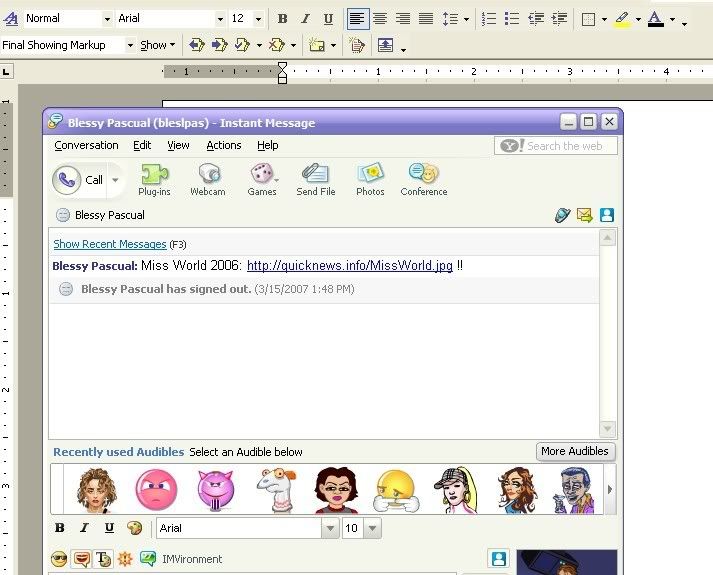
Yahoo Messenger Trojans/ Malware Infection Links

Anyone will receive different kinds of offline and online messages from friends and acquaintances. Some would be links to other websites they have done, pictures or news feeds. But while these would be helpful in most cases, it would be best to first query the person and ask what the site is all about.

Cases of rapidly increasing links that creep into the instant messaging service create havoc and spread to the entire contact list of people endorsing the various instant messaging services available over the web today. The most popular of which is perhaps Yahoo Messenger and Instant Messaging. These are the widely used modes of communication today since aside from saving on cost, they hold a wider coverage, thanks to the Internet which is available all throughout the world today.

Hence, such coverage offers a tempting way of making lives miserable and the computers a living hell. The discomforts that it would have would drive a person crazy since the need to remedy the situation may take some time. However, for some people there is always the option to format the whole system, something that is not needed by people who need to access their files regularly and have no backup copies.

[tags]yahoo messenger virus, spyware, instant messaging, hyperlinks, bad links[/tags]

Tags: , , , ,

Categories: Backups, IM, IT Security Basics, Instant Messaging, Malware, Spyware, Tips

Comments Off

Formatting May Be the Answer but Is not the Only Answer

Written by Saran on March 13, 2007

People who own computers who have given up hope for remedying the problems that their workstation has solicited, either from viruses, Trojans or spyware will normally resort to formatting and re-installation of all programs to make things easier for them. This is usually the case for people who would not bother finding ways on solving such issues, the less technical savvy people who want the best and fastest solution to such issues.

Formatting Computers

People, often referred to as geeks would go at anything to be able to find alternative solutions without having to resort to the dreaded formatting decision since it will entail a lot of issues such as data loss and re-programming as well. While it is true that it is like doing a general cleaning for the entire workstation, historical files and programs will surely be missing one by one. But it is also like starting from scratch and locating the files and programs that a person has been used to having around.

[tags]computer, formatting, programming, viruses, spyware[/tags]

Tags: , , , ,

Categories: Backups, IT Security Basics, Malware, Operating Systems, Programming, Real-World Issues, Spyware, Storage, Tips

Comments Off

Knowing When to Use System Restore in Windows XP

Written by Saran on March 9, 2007

For the people who have not yet shifted to the new installment of the Windows operating systems known as Vista, a lot of people are probably aware of the System Restore feature that Windows XP has. While such a feature is indeed helpful, especially once systems start going haywire, it also has its side effects especially when viruses and Trojans start infecting a PC or workstation.

Restoration of System Resources

For one, cleaning up is done only on the machine at its current state. But with system restore, it backs up files unknowingly and in the process, the viruses and infections as well. The best thing to do during infected states is to temporarily turn it off, clean and disinfect the computer first and then turn it on again.

This is to ensure that the files, including the files backed up are properly cleaned in the process. The new data backup will also overwrite the old ones so that a clean and well-oiled system is being used.

[tags]system restore, windows xp, windows vista[/tags]

Tags: , ,

Categories: Backups, IT Security Basics, Network Security, Operating Systems, Privacy & Anonymity, Programming, Spyware, Storage, Tips

Comments Off

Fluctuations can Crash System Hardware and Software

Written by Saran on March 7, 2007

The sudden fluctuation of electricity can harm any computer if a person is not careful. The flow of current in the computer is sure to become a problem, especially if the assembled hardware are abused by continuous disruptions which may eventually lead to system crashes from unstable operating systems or hardware. This usually occurs while a computer is on and is not protected by the usual automated voltage regulators and uninterruptible power supplies suggested today for them.

Candles during Brownouts

While most entities are equipped with generators to back-up power failures, the important thing is to allow a computer to be shut down properly beforehand. Generators are activated after 5 to 10 minutes which only produce the current from that point. Computers automatically shut down once power is cut. This is why backup batteries are created to allow proper time to back-up and shut it down properly to ensure proper system and database integrity of computers and servers today.

[tags]energy, electricity, workstation, server, ups, avr[/tags]

Tags: , , , , ,

Categories: Backups, IT Security Basics, Network Security, Physical Security, Real-World Issues, Storage

Comments Off

Breaking Codes, Breaking Rules… Is it Prestige or Trouble?

Written by Saran on March 5, 2007

Hackers, code breakers and some people who want to try out their best interest in the line of penetrating the supposedly well-secured network infrastructures that large business empires have on the web will always be the target of people who want to prove a point on their capacity to override such challenging securities.

Code Breakers and Hackers

To programmers and people who are up to date with technology, such an outlook can be fulfilling to their curious personality aspect but could also be asking for trouble. Breaching security walls is like intruding in high voltage areas where people would never experience a normal life once again once they are caught.

Hackers and code breaking individuals have made it a point to try their hand in determining up to which content they can call themselves geeks or nerds in technology and breaking a password or security id is something that is definitely up for them to consider. But hopefully, they would know the consequences for such as privacy of their lives may eventually become intruded in the future as well.

[tags]hackers, security, network, coding, code breaker[/tags]

Tags: , , , ,

Categories: IT Security Basics, Network Security, Physical Security, Privacy & Anonymity, Real-World Issues, Security Policies, Tips

Comments Off

Despising the Dreaded Blue Screen

Written by Saran on March 3, 2007

Blue screen errors

For most computer owners, experiencing that sudden blue screen in their workstations may be a sign of worse things to come. Programming conflicts, missing or corrupt files or infected system resources are sure to be the immediate thoughts that would come into mind.

No system is full-proof. Everything would indeed come to a point where the need to address such situations is evident. Formatting, re-programming and re-installations are alternative courses of action. There may be some good ways to refrain from a total wipe-out and clean installation of operating systems and programs but this would entail the expertise of seasoned technicians as well as broader understanding of why blue screens occur.

Taken into consideration, a need to check on the problem persists. Users will not be productive every time this would appear. The best way is to identify the problem through the web or by testing hardware and software functions part by part. Tracing it will evidently lead to feasible solutions for the workstation concerned.

[tags]blue screen, computer errors, operating systems, system errors, conflicts, configurations[/tags]

Tags: , , , , ,

Categories: IT Security Basics, Network Security, Operating Systems, Programming, Tips

Comments Off