Can they offer anonymous browsing?

Written by Saran on September 17, 2006

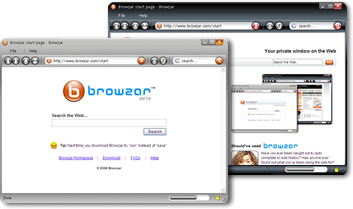
September saw the introduction of two new web browsers focusing on anonymous web browsing. Early this month, Browzar was launched by Freeserve founder, Ajaz Ahmed. It automatically deletes any cookies after each session, does not save save pages in cached folders, and its relatively small size makes it easy to bring along. There has been issues on it being merely an IE shell and that search results lead to sponsored links and adverts. Also, users need to download any security patches from Microsoft once a flaw has been identified for IE. After the two recent attacks on the browser, many are skeptical to its overall usability.A screenshot of browzar

Torpack on the other hand came from Hacktivismo, a group of computer security experts and human rights workers, and is based on Mozilla’s Firefox. No installation is required to run the browser, though the two folders generated from the free download have to be kept together for it to run. This browser encrypts the data passing from the user’s computer and the TOR network, and causes the IP address seen by the website to change every few minutes. Torpack does have limitations; browsing speeds will be slower and it’s suggested not to log-in sites which cannot offer secure log-ins.

Both of these applications are not meant to replace the current browsers you’re using in your computer. It’s interesting to note that they both have privacy and secure browsing as their main selling points. These features are useful for users who are leery of going online in public access locations like schools and Internet cafĂ©s, where a secure connection cannot be guaranteed. So far both of these are available for free download, and you might want to see which one will stand the test of continuous use.

Tags: , ,

Categories: Privacy & Anonymity, Programming, Review

Comments Off

How pharming works

Written by Saran on September 15, 2006

e-bay splash page
Though we’ve recently covered a few scams about phishing and e-mail, some swindlers have graduated from targeting victims one-by-one to a large-scale scam called pharming. Pharming can reel in potentially millions of unwitting victims to their schemes without anyone realizing it.

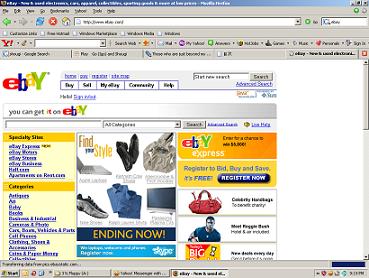
Pharmers divert as many users as they can from legitimate commercial sites to malicious ones. These sites look exactly like the genuine site, but when users sign in with their log-in names and their passwords, this information is taken by criminals. Once they have these, they can access your account information and take credit and bank account numbers for their own nefarious use. Pharming are often targeted o auction and banking sites where financial rewards are great.

The most alarming pharming threat involves something called DNS poisoning. All the hosts in the internet are identified by numbered strings called IP addresses, and computers identify different sites using these. Because it’s difficult to remember a string of 32 numbers, the Domain Name System or DNS translates these addresses to a string of text that will serve as its directory entry. A DNS directory gets poisoned when it’s altered to hold false information leading to the bogus site. Typing in the site URL serves as no guarantee, because you will still be taken to the fake site. Even savvy net users can be caught by this technique.

Site users can protect themselves by logging onto their sites using a secure (https://) connection. If you’re suspicious, you can also check your commercial site’s security certificates to see if they are real. Some sites like yahoo offer various authentication methods such as personalized seals on their mail service page, so you can identify the real site from the fake ones.

Tags: , ,

Categories: IT Security Basics, Privacy & Anonymity, Real-World Issues

Comments Off

You just might fall for it.

Written by Saran on September 13, 2006

screenshot.jpg
My name is Danjuma Sule, one of the sons of major Gen Gumel Danjuma Sule, The late Nigeria’s former minister of mines and power in the regime of the late former Nigeria’s military Head of state, Gen Sanni Abacha. I am having a huge sum of money in the total sum of $18.6Million presently hidden in a safe place –

Sounds familiar? Maybe the words are different, but the contents are almost always the same. A complete stranger writes to you, and offers a large sum of money in the form of unclaimed foreign lottery winnings, a business investment, or a transfer of illegally-obtained funds. If at this point you express interest, they’d inform you they might need a little advance to handle transactions before you receive your money. Occasionally they will present official-looking documents and ask for your bank account information, as if guaranteeing you will receive the money – but you never do.

This type of advance fee scam is often called the Nigerian 419 scam, after the law it violates in that country. Though purporting to come from Nigeria, a number of these scammers now originate from Europe and America. They send thousands of e-mails hoping one or two might bite, and strange as it might sound, people do fall for these schemes.

At first it might not seem like this is an IT security issue, but the whole operations of these scammers rely on the Internet. They can create a new identity online with a few keystrokes, photos and addressed acquired off a search engine, and a free e-mail account. They’ve recently moved on to targetting online auctions, and credit card fraud. Some have even began searching for victims through popular dating services, but they cannot be traced unless they’re reported to the proper government offices. Statistics on this kind of crime is very unreliable due to the large number of cases that go unreported every year. A modest estimate has each scammer getting thousands of dollars per month. At this point you can use the technology on hand so you do not become a victim of these scams. Use search engines to verify if they are who they claim they are, familiarize yourself with their techniques, and always be constantly vigilant.

Tags: , ,

Categories: News, Privacy & Anonymity, Real-World Issues

Comments Off

Privacy in social networks

Written by Saran on September 11, 2006

You’re probably taking part in one right now : you write about how your day was on an online journal, and check out how your friends are doing on theirs. You might have a profile on another site, sharing music or photos to friends and maybe complete strangers who’ve linked their profiles to yours, and if you’re feeling particularly romantic you might try online dating. Sites like the ones offering these services promote the creation of online social networks, where you keep in touch with old friends, and make new ones with people who share your interest, but might never meet outside the web.

Sounds like a good thing, all in all. Except for the issues dealing with privacy.

Privacy. In its basic sense, it’s all about keeping certain things that you want to keep to yourself private. It’s always important to safeguard your personal information, especially with people ready to use it for criminal acts against you. But it leads to a tricky situation when you’re dealing with social networking sites, where you might not be aware you’re giving this same information away. After all, popular sites like MySpace allows visitors not logged in to the site to visit profiles. And recently Facebook, a social networking site geared for college students, faced protests from its users when they announced the news feed feature. Users felt it was a breach of their privacy, going so far as to call it stalking, even if most of the information you can get from these were things readily available to their friends. Though the clamor has died down, and Facebook has added privacy settings, the users are now aware how much information Facebook can actually share.

It’s a fact that since Facebook is the one providing the services to connect users to each other, they can make changes in their privacy policy and how they give those services to the users. Users might not like these changes, but they must accept it, or shift to another service. Facebook, and other companies like it, should also take their users’ possible reactions to any percieved attack on their privacy if a situation like this arises again.

Tags: , ,

Categories: News, Privacy & Anonymity, Real-World Issues

Comments Off

Anonym.OS

Written by Saran on September 7, 2006

Anonym.OS is an interesting development on the LiveCD front. Its an OpenBSD based operating system on a CD, engineered for anonymity.

According to the various news sources, Anonym.OS is running in secure mode, but changes its TCP packet length, and other technical details, to make it appear as a Windows XP SP1 system.

This is an interesting concept, and it does indeed seem to be engineered for anonymity. Provided it doesn’t leave any unique fingerprint, this should be a fairly big step towards reclaiming some anonymity.

The project website itself talks of government surveillance and corporate content restrictions. The Anonym.OS CD contains “strong tools for anonymising and encrypting connections”.

Anonym.OS makes use of the Tor network; an onion routing network which uses an array of servers to pass encrypted traffic. This prevents tracing, but slows down the connection considerably.

Tags: , ,

Categories: Network Security, Operating Systems, Privacy & Anonymity

1 Comment

Virtual Private Networking: What Is Tunneling?

Written by Saran on August 4, 2006


Tunneling is a method of using an internetwork infrastructure to transfer data for one network over another network. The data to be transferred (or payload) can be the frames (or packets) of another protocol. Instead of sending a frame as it is produced by the originating node, the tunneling protocol encapsulates the frame in an additional header. The additional header provides routing information so that the encapsulated payload can traverse the intermediate internetwork.

The encapsulated packets are then routed between tunnel endpoints over the internetwork. The logical path through which the encapsulated packets travel through the internetwork is called a tunnel. Once the encapsulated frames reach their destination on the internetwork, the frame is decapsulated and forwarded to its final destination. Tunneling includes this entire process (encapsulation, transmission, and decapsulation of packets).

Tags: , , , ,

Categories: IT Security Basics, Network Security, Physical Security, Privacy & Anonymity, Security Policies

1 Comment

Verify the messages you receive

Written by Saran on July 19, 2006

yahoo messenger at work

Related to the Yahoo instant messenger post, this entry is to remind you that you have to take note of the messages that you receive via IM. There are ways to hack your accounts and it will too much trouble to deal with them, if you think about it. Especially when you have a lot of contacts from different cities in the world that you have to warn about it.

Instant messaging
It is convenient to have instant messaging. It makes you accessible to anyone and everyone all the time. You can look at your buddy list and send them IMs no matter how far apart you are and you do not have to spend so much on calls or SMS for that matter. But apparently it is also convenient for hackers to take advantage of.

Who is sending you messages?
Are you sure that you know the people in your buddy list? Sometimes people you do not know well add you to their buddy lists just because. Sometimes you meet other people and you exchange contact information, including Yahoo IDs, or whatever you are using. If you chat with them often enough, you would get used to messages suddenly popping out saying they came from these trusted sources. But you actually never know.

Check the links
Links that come from your buddies do not always come from them. If their accounts have been hacked you could get links to sites that have content you do not really like. What you could do is ask them before clicking the links. That way both of you would be aware. If you and your buddy always talk about home improvement, wouldn’t it be a bit strange if you get a link about dating. Especially if this online buddy is more of a professional contact.

Tags: , ,

Categories: Privacy & Anonymity, Real-World Issues, Tips

Leave a Comment

Beware clicking links from IM and spoofed sites

Written by Saran on July 17, 2006

Yahoo messenger

If you are a Yahoo! user who regularly talks on Yahoo Instant Messenger, you have to beware of links that appear to have come from your contacts or buddies. There are some incidents of Yahoo accounts being hacked because of those links.

Modus operandi
What usually happens is that a buddy of yours will supposedly give you a link to something. It might be a Geocities page or a Yahoo photos page. Sometimes it seems as though it is a random page on your buddy’s Yahoo photos page or Geocities account. It would usually seem innocent enough. If you click it, it will direct you to a page that will require you to log in. You will probably just get stuck on that page. As if nothing has been going on. But the bad thing is that if you did try to log in, your password is already known by the person who created that page.

Have you encountered anything similar? If you have, maybe it is time to change your password.

The effects
Your Yahoo account gets hacked. The terrible thing is that you will seem to pass on different links to people on your buddy list. It would have been ok if it was some useful link like DIY stuff or something similar. But no – it leads to the spoofed Geocities or Yahoo photos site. The bad thing is that you won’t even know until you get contacted by the people on your buddy list. If you have friends from different countries, the time zones would affect how you would try to tell them that your Yahoo account got hacked. There are some messaging clients that use the Yahoo protocol that does not seem to support mass messaging so you have to do it as soon as you catch them online or you would have to send them all emails somehow.

This tip is not necessarily about your computer and the data in it per se, but it is more for you and your online identity.

Tags: ,

Categories: Privacy & Anonymity, Real-World Issues

Leave a Comment

Online services and their privacy statements

Written by Saran on July 14, 2006

privacy

Do you socialize a lot online? Is it through chat, email or voice over internet telephony? Do you make a lot of online transactions? Where? Ebay?

If you have answered yes to a lot of those questions, here is another question for you: Do you read the terms of service of the sites that you sign up for in order to utilize their services? If yes, do you make sure that you even have a copy of it? If not, maybe it is time you should.

When we sign up for online services, we give out a lot of information about us. Some might be as detailed as including bank account numbers and credit card numbers too, especially if these are banking services and/or online auctions. There are different terms of service and privacy statements. Sometimes we just sign up without bothering to read on those. There are actually some sites that change their terms of service without notifying the users. Same thing goes for their privacy clause.

Usually privacy clauses would say that the information you provide is confidential and that they would not be passed on to others. However you cannot be too sure about them all the time. There are different cases linked to identity theft because of the information others have taken off the Internet. In America, there are some documentaries already and hopefully there will be sensible actions to be done about it. You don’t want to worry too much about buying flowers for your wife using your credit card. It is better to be aware rather than to feel sorry in the end.

Tags: , ,

Categories: General, Privacy & Anonymity, Real-World Issues

Leave a Comment

ADP gives unauthorized party shareholder information

Written by Saran on July 12, 2006

data processing center

An article in Computerworld shows that the Automatic Data Processing Center gave its shareholder information to an unauthorized party. This unauthorized party has been said impersonate corporate officers. The information included were not just names but also addresses and the number of shares they had. There are further investigations on the matter. The number of affected accounts remain undisclosed.

There are different ways in which security is breached. The intrusion may happen within your own company or outside of it. You could never tell which one will happen. The difficulty about having security breached internally is that you have placed your trust among certain people and you could never tell which one of them did it or why it has come to pass.

For such cases, there has to be a policy that will prevent this from happening. It looks as though they have given the data without much careful thinking as it was an ‘unauthorized party’ they gave it to. This is difficult to accept. Policies should be strictly imposed too. And also, maybe there is something lacking in the way personnel are trained in handling such information. If that might have been the case, they should be trained to analyze situations carefully before giving out any kind of information, especially confidential ones. The only consolation in this case, perhaps, is that account numbers and Social security numbers were not included in the information that was given.

Tags: , ,

Categories: General, Privacy & Anonymity, Real-World Issues

Leave a Comment