Hiding Identities Online

Written by Saran on January 12, 2007

For bloggers and writers, using pen names has been a normal scenario, some of which who would want to keep their identities apart for privacy reasons. While some would not care and would want to gain the due recognition for their work, it entirely depends on what the blog or composition is all about.

Hiding your Identity

Privacy over the Internet is only normal. Who would want to be cited for something which may become a means of ruining their reputation online? Risky is the right term for most people, but upon voicing opinions, making a stand and living by what you believe in despite what critics may eventually say is something that people would want to be known for.

For sure, this may draw varied criticisms and comments, but the bottom line of it all is that it depends on how daring a person can get and up to what extent he is willing to push himself.

[tags]privacy online, identities, pen names[/tags]

Tags: , , , ,

Categories: Privacy & Anonymity, Tips

Comments Off

The Deal with Linux and Windows Operating Systems

Written by Saran on January 2, 2007

Operatings Systems Layout

A lot of workstations and servers will always have the choice of selecting which operating system to used. Without question, Microsoft’s Windows Server Operating Systems is the first thing in mind to be used although Linux has had its share of being the best alternative operating system today.

The deal here would be efficiency and reliability. This is just the backend of most systems and the choice for which operating system to use would all depend on the programming language and database compatibility with regards to OS preference.

There has been a number of programming softwares that are developed and used today. For each one, like Sybase and Visual Basic, software developing companies have gone to the extent of even making special compatibility towards preferred OS of end-users. This serves as a basis for comparison in determining on which platform that preferred programming software would be entirely performing better. This allows flexibility for users and a wider array of possibilities for systems administrators and developers who compile useful executable programs today.

Tags: , , ,

Categories: Operating Systems, Privacy & Anonymity, Programming, Tips

Comments Off

Virtual Private Networking Explained

Written by Saran on December 15, 2006


A virtual private network (VPN) is the extension of a private network that encompasses links across shared or public networks like the Internet. A VPN enables you to send data between two computers across a shared or public internetwork in a manner that emulates the properties of a point-to-point private link. The act of configuring and creating a virtual private network is known as virtual private networking.

To emulate a point-to-point link, data is encapsulated, or wrapped, with a header that provides routing information allowing it to traverse the shared or public transit internetwork to reach its endpoint. To emulate a private link, the data being sent is encrypted for confidentiality. Packets that are intercepted on the shared or public network are indecipherable without the encryption keys. The portion of the connection in which the private data is encapsulated is known as the tunnel. The portion of the connection in which the private data is encrypted is known as the virtual private network (VPN) connection.

VPN connections allow users working at home or on the road to connect in a secure fashion to a remote corporate server using the routing infrastructure provided by a public internetwork (such as the Internet). From the user’s perspective, the VPN connection is a point-to-point connection between the user’s computer and a corporate server. The nature of the intermediate internetwork is irrelevant to the user because it appears as if the data is being sent over a dedicated private link.

VPN technology also allows a corporation to connect to branch offices or to other companies over a public internetwork (such as the Internet), while maintaining secure communications. The VPN connection across the Internet logically operates as a wide area network (WAN) link between the sites.

In both of these cases, the secure connection across the internetwork appears to the user as a private network communication—despite the fact that this communication occurs over a public internetwork—hence the name virtual private network.

Tags: , ,

Categories: IT Security Basics, Network Security, Privacy & Anonymity

Comments Off

VoIP and security

Written by Saran on December 11, 2006

voip

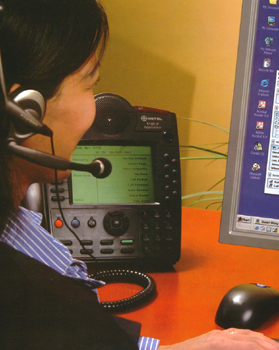
Do you use VoIP a lot at home or in your office? If you do, you have to make sure that you are updated when it comes to security issues. For one thing there’s spam over IP telephony. Spam doesn’t just come in the form of comments on blogs or email. You could also get it on VoIP. Good thing that there are companies such as Sipera which is trying to crackdown SPIT. It would surely be a hassle if you don’t deal with it because you might get calls for credit card offers and what-not.

One other thing that researchers are concerned about is that VoIP applications like Skype are open to hacker attacks such as denial of service. Cisco has dealt with it with their CallManager. But what about every other application out there? Are they all secure enough to use? That is why maybe it is time to have the specs out in the open so that there could be more people working on making it more secure.

VoIP sure is useful but people sometimes abuse it. Like in the article about phishing and VoIP, phishers try to make things set up so that they could appear as though they are banks and they would make users call a certain number. How terrible to pretend something they are not! Quite sinister, if I may add. That is why people have to be very careful when it comes to such calls. One must validate the claims and check out the source. Checking the background is going to be an essential.

We need to be responsible with the technology that we use. This is especially when we use it for business. We never know who will be affected.

Tags: , ,

Categories: Network Security, Privacy & Anonymity, Real-World Issues

Leave a Comment

Choosing which data encryption to use

Written by Saran on November 24, 2006

Harddisk-head.jpgOften we think of security in terms of applications that can be used to safeguard our data, but there can always be different approaches to the same problem. Encrypting the data in your hard drive may be the key to keeping it safe in these days of laptop theft.

Data encryption for hard drives can come in two forms. You can either use a software to encrypt your data, or have a drive that required password identification before gaining access to the files inside. The first method can be performed with a selection of open source and licensed software. The files are protected even when the Operating System is not on. This works in different ways. Some software create a virtual drive inside the hard drive to store the data. the virtual drive will take up an allotted amount of space in the drive, but it cannot be accessed unless the password or set of passwords have been given. This type of data encryption can also be performed on drives that had no form of security encryption originally like the computer you’re currently or even thumb drives.

Hard drives with encryption has been available for the past year, most often in the form of external drives that can be brought to different places and handled by more than one user. These hard drives operate with full encryption, where the data in the whole disk is encrypted. Some of them combine password identification with biometrics to give double security to the files inside them. These drives come with a chip containing special software that does the decrypting and encrypting without taking too much time. The problem with this method is that if the password is forgotten, the data can’t be recovered. Seagate had recently announced that they will be shipping hard drives with an improved full disk encryption they call DriveTrust on January. These two methods will protect the files in the hard drive, and it’s only a matter of choosing which suits you best.

[tags]data encryption, data, security, drive encryption[/tags]

Tags: , , , , , ,

Categories: Cryptography, Privacy & Anonymity, Storage

Comments Off

Legal Software Updates

Written by Saran on November 12, 2006

windows

Anecdotes from people are interesting all the time. There is this one person who was using a pirated copy of Microsoft Windows XP. One time, this person tried getting the security updates. Then something happened: this person had a message on the computer that the copy of Microsoft Windows XP is pirated and if the person wanted to keep on using it with security updates and stuff like that, a legal copy must be purchased. Now the thing is that everytime the computer is booted up, it shows that message. The person told me this: the moral lesson for those using pirated software is to not update!

Then again, how could one keep on using software that hasn’t been updated? There are security updates and sometimes they are critical ones. If you can’t get them for your system, you never know what you are exposing your computer to. Think of the MySpace news some time ago. Internet Explorer had a vulnerability. If you are a user who did not update, you would have probably been a victim.

Now we see from this anecdote that it is important to have legal software. We do not just have something we could use without guilt but we also get whatever updates the developers have in store. It would be bad for productivity to keep on dealing with malware and viruses because of the lack of updates.

If you are someone who can not afford legal copies of software because they are expensive, you could always download free and open source software. That way you have legal software and you could secure your system because you would have legal access to the security updates and all that.

Tags: , , , , ,

Categories: Backups, IT Security Basics, Network Security, News, Privacy & Anonymity, Spyware

Comments Off

AOL Spam Policies

Written by Saran on November 10, 2006

AOL are planning to charge for emails. Mass mailers will be able to pay for a higher priority delivery, bypassing the AOL spam filters and ensuring that mail is received directly in the end users inbox.

This is, obviously, a bad thing since spammers will be able to pay a small offset to ensure that their messages are delivered direct to the end users inbox, whilst legitimate messages will face the AOL spam filter gauntlet. Programmes such as this will only see a rise in spam, and a fall in the success rate of legitimate mail being successfully delivered.

Tags: , , ,

Categories: News, Privacy & Anonymity, Real-World Issues, Security Policies

Comments Off

Tips to keep your identity safe

Written by Saran on October 27, 2006

http://commons.wikimedia.org/wiki/User:Juntung

Identity theft sounds like it’s mostly done online by hackers who try to scam your information off you, but some of the easiest techniques can be done without even logging in front of a computer.

Frank Abagnale is probably the best example of a successful identity thief. In the late sixties he created different personas to get jobs, free airplane trips, and draw money from various banks before being caught and sent to jail for six years. Since then he’s given his expertise to combatting the same crimes he was charged with, becoming one of the foremost document security experts out there. Here’s several tips from him on how to avoid getting your identity stolen:

  • Shred, shred, shred. Dumpster diving can turn up documents with revealing personal information printed on them. Try to use a cross cut shredder to get Some of the documents you should shred are pre-printed checks and pre-approved credit card mailings. They may have your credit card or account numbers written on them, and it only takes a phone call to order and put that to your account.
  • Check if you’re missing any mail, especially credit card records and bank statements. And while we’re on the topic of mail - go through your statements and make sure all of your purchases are accounted for.
  • Don’t carry anything you don’t need. This applies to Social Security cards, extra credit cards, and any other papers. Leave them in a safe place at home. If you lose them or they get stolen they’ll be more than enough to take your identity.
  • In the eventuality that your credit card or papers are stolen, know what government agencies and bank hotlines you can call to report it immediately. The smaller that window between the theft and the report, the shorter the time they can use your data.

[tags]identity theft, tips, Frank Abagnale[/tags]

Tags: , , , ,

Categories: Privacy & Anonymity, Real-World Issues, Tips

Comments Off

A few tips to avoid phishing

Written by Saran on September 29, 2006

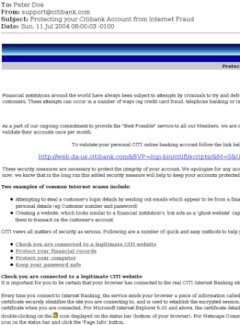
phishing example Chances are that when you open your inbox today you’ll find an e-mail claiming to be from your bank, an e-commerce site, or another online site you’ve visited. They might offer you an upgrade to your account, inform you that there’s been changes to their, and asks you to verify your account information. This could be a phishing attempt to get sensitive information like your personal information or passwords. Fortunately, you can avoid getting scammed by taking these precautions:

  • Be suspicious of any email with urgent requests for personal financial information. Phishers are getting more sophisticated in their attempts, so even if an e-mail appears to be legitimate, look for proof that it came from your e-commerce company. They should be personalized and carry information that only you and your company would know. They might show partial account numbers or other verification tools.
  • Use anti-virus software and a firewall, and keep them up to date. Phishers sometimes include script that can track your activities on the internet without your knowledge.
  • Never use the links in an e-mail to go to any webpage. Phishers will redirect you to a bogus site to trick you into logging in your account number and password. Log onto the website by typing in the web address to your browser. At the same time, never call any numbers in the e-mail. It could lead you to a VoIP provider that isn’t connected to your company at all.
  • Never fill out forms in e-mail messages asking for your personal financial information. Your e-commerce company would never ask you to send sensitive information in that manner.
  • Check your bank, credit, and debit card statements regularly to see if all your transactions are legitimate. Report any suspicious withdrawals immediately.
  • Finally, report the phishing attempt you received to your company and other anti-phishing groups.

[tags]phishing,spam,spoof emails,indentity theft,pharming,spam filtering[/tags]

Tags: , , , , , , , , ,

Categories: General, Privacy & Anonymity, Real-World Issues, Tips

Comments Off

Can they offer anonymous browsing?

Written by Saran on September 17, 2006

September saw the introduction of two new web browsers focusing on anonymous web browsing. Early this month, Browzar was launched by Freeserve founder, Ajaz Ahmed. It automatically deletes any cookies after each session, does not save save pages in cached folders, and its relatively small size makes it easy to bring along. There has been issues on it being merely an IE shell and that search results lead to sponsored links and adverts. Also, users need to download any security patches from Microsoft once a flaw has been identified for IE. After the two recent attacks on the browser, many are skeptical to its overall usability.A screenshot of browzar

Torpack on the other hand came from Hacktivismo, a group of computer security experts and human rights workers, and is based on Mozilla’s Firefox. No installation is required to run the browser, though the two folders generated from the free download have to be kept together for it to run. This browser encrypts the data passing from the user’s computer and the TOR network, and causes the IP address seen by the website to change every few minutes. Torpack does have limitations; browsing speeds will be slower and it’s suggested not to log-in sites which cannot offer secure log-ins.

Both of these applications are not meant to replace the current browsers you’re using in your computer. It’s interesting to note that they both have privacy and secure browsing as their main selling points. These features are useful for users who are leery of going online in public access locations like schools and Internet cafĂ©s, where a secure connection cannot be guaranteed. So far both of these are available for free download, and you might want to see which one will stand the test of continuous use.

Tags: , ,

Categories: Privacy & Anonymity, Programming, Review

Comments Off