Better Security by Thinking as a Hacker

Written by Saran on October 23, 2007

The best way to find out the security breaches is to think like a hacker on how to penetrate a secure network through various means. Accessibility to servers may have to go through different stages since various encrypted usernames and passwords would stand in the way of a successful hack.

Network Hacker

The approach is quite simple. It is a reverse psychology of sorts since to become a full-proof secure system, ways on how to be able to get over the fences for such walls that have been put off must be severely tested.

Unorthodox as it may seem, the various approaches to be done will certainly be simple at this point because at the rate that hackers are able to go around security fences today, a lot of progress has been made in being able to make the lives of administrators a living hell as far as IT security is concerned.

[tags]hacker, network security, breach, coding, cracks, cryptography[/tags]

Tags: , , , , , ,

Categories: Cryptography, IT Security Basics, Network Security, Operating Systems, Privacy & Anonymity, Programming, Real-World Issues, Security Policies, Spyware

Comments Off

Password Protection for Word and Excel

Written by Saran on January 22, 2007

For confidential files that people would want to be kept at maximum security, applying passwords to ensure that only proper personnel will be able to open them has been the regular exercise for basic security measures. Among the usual files that would require such security levels are that of payrolls, business plans, and management projections and outlook, a lot of which are kept in safe storage to avoid people and competitors from planning to gain access to them.

Password Protection on Word and Excel

Payrolls, especially for people who are at higher levels are usually restricted materials. The only person allowed to access them would usually be the finance, personnel and upper management honchos. In organizations, curiosity and challenge are the usual culprits for people to try and crack the passwords. However, if they are already under wraps and given advanced warnings, access can be limited and contained so that they would not even entertain the thought of doing such mischief which will not do them any good anyway.

[tags]password protect, cryptography, file access[/tags]

Tags: , ,

Categories: Cryptography, IT Security Basics, Operating Systems, Physical Security, Tips

Comments Off

Unveiling Operating System Secrets

Written by Saran on January 16, 2007

The complete commands and processes to which a computer operates cannot be covered in a day nor will be remembered in one sitting. Ideally, only the important things for consideration such as that of user friendly commands to allow proper interface between the computer and the user behind the keyboard will always be the only know-how that would remain.

Computer Secrets

Computer operating systems such as Linux and Windows offer a wide variety of benefits for people, especially in maximizing the capabilities of a computer and the installed software. Speed and reliability are among the important aspects that computer owner will always want and to be able to perform them, proper identification and references would need to be researched on.

It is a given that most people would not spend time studying all the aspects of a computer system. However, there will be instances when such accidental discoveries from exploring the computer operating system and its resources would ignite interest and push a person into further exploring information surrounding the issue and perhaps look at other benefits that operating systems provide but are not given much attention.

[tags]windows, linux, secrets, system hints, system resources[/tags]

Tags: , , , , , , , , ,

Categories: Cryptography, IT Security Basics, Operating Systems, Programming, Tips

Comments Off

Why Users Should Change Their Password Regularly

Written by Saran on December 27, 2006

Password Theft

Anyone would often be advised to regularly change his password in any access points such as e-mails, log on servers and websites. Reason for this is to increase the need for security as far as gaining access and safeguarding files and pertinent information that is usually stored.

With the large number of hackers that have been cropping up one by one, various means to steal passwords,also known as phishing, or hack accounts have been their main course of action. While some would disregard such acts, the real pain begins once important messages, attachments and relevant information are tampered. True that some would not need to change passwords regularly, but just to be on the safe side, it is best to maintain a regular schedule of updating password security and make it a combination of numbers and letters to establish a more secure and harder way of being cracked or accessed by anyone today.

[tags]password theft, passwords, hacking, cracks, codes, security[/tags]

Tags: , , , , , , , , , , ,

Categories: Cryptography, IT Security Basics, Network Security, Programming, Real-World Issues, Security Policies

Comments Off

Choosing which data encryption to use

Written by Saran on November 24, 2006

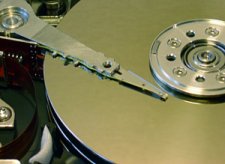
Harddisk-head.jpgOften we think of security in terms of applications that can be used to safeguard our data, but there can always be different approaches to the same problem. Encrypting the data in your hard drive may be the key to keeping it safe in these days of laptop theft.

Data encryption for hard drives can come in two forms. You can either use a software to encrypt your data, or have a drive that required password identification before gaining access to the files inside. The first method can be performed with a selection of open source and licensed software. The files are protected even when the Operating System is not on. This works in different ways. Some software create a virtual drive inside the hard drive to store the data. the virtual drive will take up an allotted amount of space in the drive, but it cannot be accessed unless the password or set of passwords have been given. This type of data encryption can also be performed on drives that had no form of security encryption originally like the computer you’re currently or even thumb drives.

Hard drives with encryption has been available for the past year, most often in the form of external drives that can be brought to different places and handled by more than one user. These hard drives operate with full encryption, where the data in the whole disk is encrypted. Some of them combine password identification with biometrics to give double security to the files inside them. These drives come with a chip containing special software that does the decrypting and encrypting without taking too much time. The problem with this method is that if the password is forgotten, the data can’t be recovered. Seagate had recently announced that they will be shipping hard drives with an improved full disk encryption they call DriveTrust on January. These two methods will protect the files in the hard drive, and it’s only a matter of choosing which suits you best.

[tags]data encryption, data, security, drive encryption[/tags]

Tags: , , , , , ,

Categories: Cryptography, Privacy & Anonymity, Storage

Comments Off

The Nmap Scanner

Written by Saran on November 20, 2006

The nmap port scanner can be used by attackers to determine which ports are open on a remote system, and which services are running on those. Recent versions are even capable of fingerprinting the exact application and version number running, allowing an attacker to fine-tune their attack to such a system.

But nmap was not designed for this purpose, it was designed to help the network administrator prevent attacks by doing the same thing; checking their network for points of weakness.

When setting up servers, firewalls or other network-connected systems, I always run an nmap scan on the “finished” system, and then lock down anything which appears that doesn’t need to be accessed from the outside world. On a Linux system, for instance, X11 and services such as MySQL may listen on TCP ports, but there is often no need for a remote system to connect into these services. In such a situation, firewall rules allowing only localhost (127.0.0.1) to access these ports prevents them showing in any subsequent nmap scans (provided the scans are from a remote machine!).

Nmap supports many scan types, designed to obtain information about the network (ping sweep scanning, for instance), the open ports (TCP connect, UDP and half-open, or stealth, (SYN) scanning), and the operating system and services running (OS and service fingerprinting).

Each scan type provided by nmap can give the system administrator useful information, and by thinking along the same lines as an attacker, the administrator can often close off parts of the network, lock down services on accessible systems, and generally reduce the avenues of attack. Nmap is an essential tool in highlighting which of these avenues are open in the first place, allowing an administrator to block potential attackers before they become a problem.

Tags: , , , ,

Categories: Cryptography, IT Security Basics, Network Security, Real-World Issues, Wireless Security

Comments Off

New Secure IM Software

Written by Saran on October 5, 2006

NTT Communications (Japan) have created a new secure Instant Messaging system. This system communicates over TLS (Transport Layer Security), the successor to the SSL standard.

Communications on most IM systems are secured between client and server - where password exchange typically takes place, but once the initial connection has been established, messages themselves are usually passed directly between clients. In the new messaging system, all communication goes through the sever, and is performed over an encrypted TLS connection.

This allows, apparently, restrictions on the server to govern which users can talk to each other, which types of files may be sent, and so on.

This sounds like a great idea, but there is a reason for current systems to communicate directly between clients - a single relay server is a single point of failure, and also serves as a bottleneck in the network. Using TLS only serves to further slow down the server, and I am not sure how well this solution would scale (though a network of servers, IRC style, might work…)

Meanwhile, for small to medium corporations, this could be the secure solution that has been needed for a long time. It will be a while before it becomes scalable to the entire Internet, though, I expect.

[tags]IM software,bottleneck,encryption,data centers, instant messaging, online security[/tags]

Tags: , , , , , , ,

Categories: Cryptography, Network Security

1 Comment

2006 Security Book Roundup

Written by Saran on August 18, 2006

This year has seen a steady increase in the number of books being published on security-related topics. Since the year is about to end, I thought I’d round up a few of the best I’ve read, seen, or heard about, and comment briefly on each one!

Apache Security
O’Reilly
Published March 2006
http://www.amazon.co.uk/exec/obidos/ASIN/0596007248/

This book covers installing a secure Apache web server, discusses a variety of attack techniques, and looks at securing a multi-user hosting environment. All round, an excellent book for webhosts or anyone running Apache on an Internet-accessible system!

SSH, The Secure Shell: The Definitive Guide, Second Edition
O’Reilly
Published May 2006
http://www.amazon.co.uk/exec/obidos/ASIN/0596008953/

This book takes a look at the SSH program, a replacement for telnet or rsh, providing an encrypted link over which programs can be run. SSH also contains programs for file copy, replacing rcp and perhaps even FTP! The book looks at the latest developments in OpenSSH and other SSH implementations, and includes some powerful examples including setting up SSH tunnels and forwarding systems.

Security And Usability
O’Reilly
Published February 2006
http://www.amazon.co.uk/exec/obidos/ASIN/0596008279/

This book reaches a compromise between the two design goals of security and usability. I haven’t actually read this one, but everyone I speak to that has thinks its worthwhile!

Extrusion Detection
Addison-Wesley
Published June 2006
http://www.amazon.co.uk/exec/obidos/ASIN/0321349962/

One of the few books in publication which covers the important topic of internal attacks! Again, I haven’t read this, but it is an important topic, and its nice to see books finally starting to appear to bridge the gap between the generic security books and the knowledge that network administrators need!

Cryptography In The Database
Addison-Wesley
Published May 2006
http://www.amazon.co.uk/exec/obidos/ASIN/0321320735/

This book approaches security from the opposite end to many; from the innermost structure in many applications. Databases are often left open to attack because it is assumed that the outer layers of a program protect any database access against exploitation. Using cryptography in the database helps to prevent attacks which take advantage of most peoples false sense of local security! Once again, this book is a much-needed addition to the stores!

If I’ve left out your favourite security book of the year, or, if you’re one of the lucky few, the book you wrote this year, don’t be offended! I just chose a few of the ones that stood out most to me. There were, as I said, a large number of books dealing specifically with security this year, from VPNs to SSH, rootkits to software vulnerabilities, Apache to IIS, and PHP to SQL. In each case, the books have contributed new and fresh ideas, shown the latest attack patterns, and offered advice for prevention, or, failing that, cure.

As the threat from malware, malicious hackers and even corporate software with unintentional (or intentional) security issues grows, books like these serve not only to educate the developer and system administrator in prevention, but also to alert the user to the threat. Most technical users cannot fail to notice the distinct rise in security related books this year, and should easily be able to correlate this to the ever-increasing threat as our world becomes ever more connected!

Tags: , , , ,

Categories: Cryptography, IT Security Basics, Real-World Issues, Review, Tips

2 Comments

MD5 Revisited

Written by clouseau on August 14, 2006

Recently, a programmer named Patrick Stach released unto the world his working source code for generating an MD5 collision within a very reasonable amount of time for most desktop PC’s. Leave it to the media to sensationalize it and proclaim that MD5 is now BROKEN! Run! Go out and buy duct tape! While it is true that no true security product should be relying on MD5 for anything serious, it’s not quite the end of the world that many of these news geniuses are painting it as.

The fact of the matter is that most Linux and other UNIX distributions use the MD5 hashing algorithm to handle their password database for the users. It takes your password, hashes it using MD5, and then stores that. When a user attempts to login via SSH for example, the system takes the password they typed and then hashes it using whatever algorithm it was configured to do (which is MD5 in most cases) and then compares it to the hash that’s in its database. If it matches, then the user entered the correct password and is granted access to the system. If they don�t match, they obviously didn’t type in the right password. The security in these hashing algorithms lies in the fact that each and every series of letters will have a unique hash. In English, I can rest easy at night knowing that the hash of “cat” will NEVER be the same hash of “dog“.

So the security community is up in arms about the fact that they now have an actual implementation of generating MD5 collisions, instead of it being a hypothetical paper that the general public would never understand. So what exactly is the impact of this little release you might be wondering? Well, you can put away that duct tape because your NIX servers will remain running tomorrow just fine. The truth is you can’t use this utility to be able to break a hashed password any faster. Instead what this does it allows you to find a pair of “plaintexts” (term for normal words/letters) that will come out to the exact same hash value. This is not supposed to be possible, but because of the discovered weakness in MD5, it is. Either way, the release utility does not help anyone find the “plaintext” from an MD5 hash. That is still impossible and does require you to brute force crack any hashes. It also means that MD5 is STILL safe to use as a file verification tool. While I’m not advocating the continued use of MD5, it’s still not the end of its life.

Tags:

Categories: Cryptography

1 Comment

Hashing Algorithms From A Cryptographic Perspective

Written by Saran on June 23, 2006

With the recent news of collisions and reductions in attack complexity in both MD5, a commonly used algorithm for checksums on file downloads and integrity checkers, and SHA-1, a commonly used cryptographic hash algorithm in many encryption products, this brings up the question of where to go next, if you are implementing software which uses cryptographically strong hashing.

The SHA (Secure Hash Algorithm) family of algorithms, validated by NIST, and standard hash algorithms for cryptographic use, contains not only SHA-1 but an older algorithm called SHA-0, for which attacks have also been reported, and the SHA-2 family, which consists of SHA-224, SHA-256, SHA-384 and SHA-512, collectively.

SHA-256 forms a new minimum recommendation, in many cryptographers eyes, given the attacks on SHA-1. Whilst these attacks do not rule out SHA-1 for general use, in order for new software making use of hashing algorithms to be secure for the near future; perhaps a decade, it is important to prepare for the attacks on SHA-0 and SHA-1 becoming more feasible, especially as the cost of computing goes down, and the power continues to rise.

SHA-224, SHA-256, SHA-384 and SHA-512 are all named respective to the number of bits in the output hash. The more output bits, the harder it is to create a collision, in general, unless there is a weakness in the hash function itself, as has been found in SHA-0 and SHA-1.

Of course, the SHA-2 family are based on SHA-1, with slight differences in design and larger output, so it is possible that these have potential attacks also, but the size of the brute-force space is dramatically increased, and so these variants of the SHA family will withstand attack for longer, and should prove reliable for the near future.

Looking into the long term, few solutions exist currently that are not based on the SHA format. There are two main contenders, currently, in the form of the RIPEMD family, and the WHIRLPOOL family.

RIPEMD comes in the following flavours, in each case, the number represents the hash size in bits: RIPEMD-128, RIPEMD-160, RIPEMD-256, and RIPEMD-320. RIPEMD-128 is a replacement for the original RIPEMD, which was found to have security issues, whereas the others all increase the output size, and therefore the associated security. Again, this family is based on a construct which has been proven susceptible to attacks in the past, so it is possible that the entire family could have weaknesses.

The other main alternative, WHIRLPOOL, has no known attacks, and has had two major changes to further improve its security.

WHIRLPOOL is a 512-bit hash function. The changes mentioned involve a change from a randomly generated s-box (substitution box) to one designed to be cryptopgrahically stronger, and also easier to implement in hardware, along with a change in the diffusion matrix.

Some leading cryptographers are calling for new cryptographic hash functions to be designed, perhaps in the same design-by-committee method as the AES encryption standard.

Tags:

Categories: Cryptography

Leave a Comment